Java Program to Handle Divide By Zero and Multiple Exceptions
Java Program to Handle Divide By Zero and Multiple Exceptions
Exceptions These are the events that occur due to the programmer error or machine error which causes a disturbance in the normal flow of execution of the program.
Handling Multiple exceptions: There are two methods to handle multiple exceptions in java.
Using a Single try-catch block try statement allows you to define a block of code to be tested for errors, and we can give exception objects to the catch blow because this all the exceptions inherited by the Exception class.
The second method is to create individual catch blocks for the different exception handler.
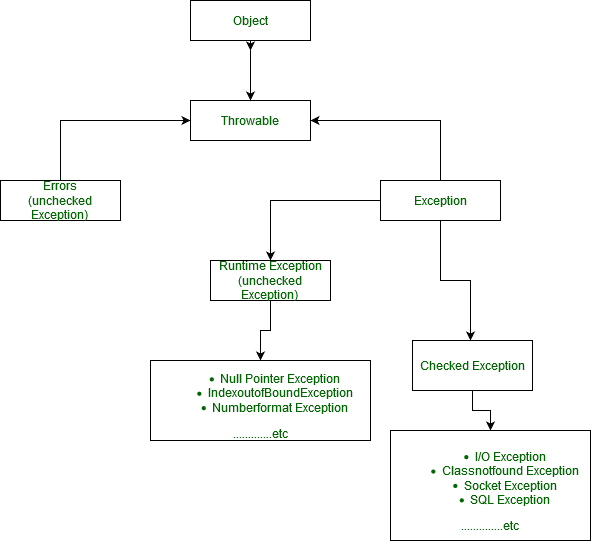
Hierarchy of the exceptions:
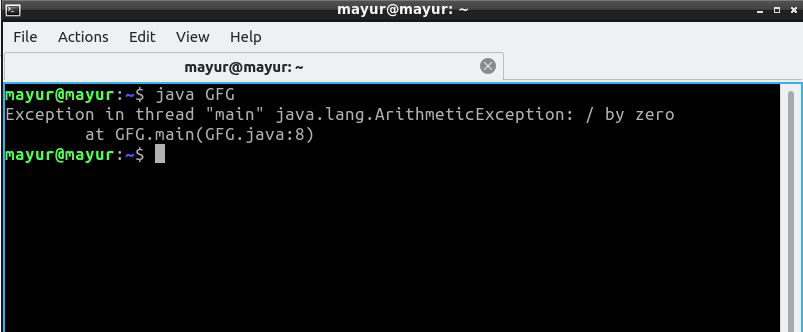
Divide by zero: This Program throw Arithmetic exception because of due any number divide by 0 is undefined in Mathematics.
|
Output:
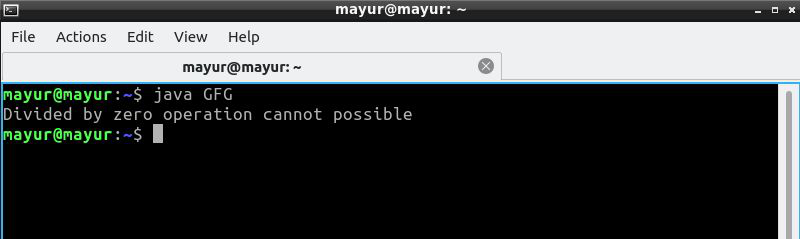
Handling of Divide by zero exception: Using try-Catch Block
|
Output:
Multiple Exceptions (ArithmeticException and IndexoutOfBound Exception)
Combination of two Exception using the | operator is allowed in Java.
As soon as the first exception occurs it gets thrown at catch block.
Check of expression is done by precedence compiler check rule from right to left of the expression.
|
Output:
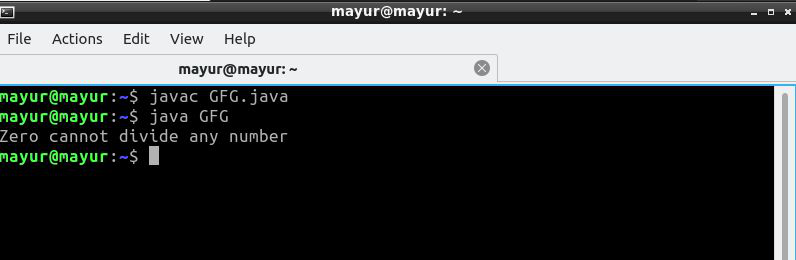
Explanation: Here combination of ArrayIndexOutOfBounds and Arithmetic exception occur, but only Arithmetic exception is thrown, Why?
According to the precedence compiler check number[10]=30/0 from right to left. That’s why 30/0 to throw ArithmeticException object and the handler of this exception executes Zero cannot divide any number.
Another Method of Multiple Exception: we can combine two Exception using the | operator and either one of them executes according to the exception occurs.
|
Output:
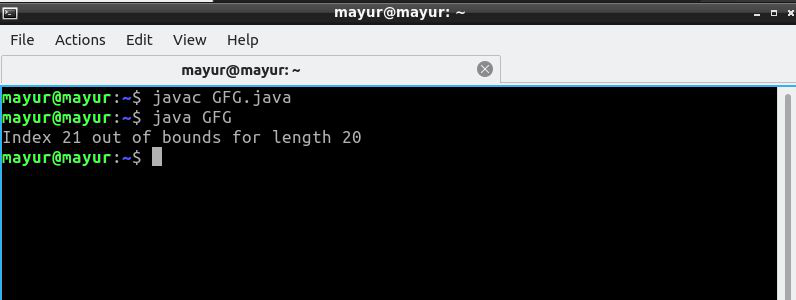
2.Write the code Array Index Out Of Bounds Exception in Java
In Java, ArrayIndexOutOfBoundsException is a Runtime Exception thrown only at runtime. The Java Compiler does not check for this error during the compilation of a program. It occurs when we try to access the element out of the index we are allowed to, i.e. index >= size of the array.
Java supports the creation and manipulation of arrays as a data structure. The index of an array is an integer value that has a value in the interval [0, n-1], where n is the size of the array. If a request for a negative or an index greater than or equal to the size of the array is made, then Java throws an ArrayIndexOutOfBounds Exception. This is unlike C/C++, where no index of the bound check is done.
Example 1: Here, we are trying to access the index which is greater than or equal to the array length.
1
// Java program to show ArrayIndexOutOfBoundsException
2
// when the index is greater than or equal to array length
3
public class GFG {
4
5
public static void main(String[] args)
6
{
7
8
// taking array of integers
9
int a[] = { 1, 2, 3, 4, 5 };
10
11
for (int i = 0; i <= a.length; i++)
12
System.out.println(a[i]);
13
}
14
}
Runtime Error Throws an Exception:
Exception in thread “main” java.lang.ArrayIndexOutOfBoundsException: Index 5 out of bounds for length 5
at GFG.main(GFG.java:11)
Here if you carefully see, the array is of size 5. Therefore while accessing its element using for loop, the maximum index value can be 4, but in our program, it is going till 5 and thus the exception.
Example 2: Here, we are trying to access the index of array which is negative.
1
// Java program to show ArrayIndexOutOfBoundsException
2
// when we access the negative index of array
3
public class GFG {
4
5
public static void main(String[] args)
6
{
7
8
// taking array of integers
9
int a[] = { 1, 2, 3 };
10
11
// accessing the negative index of array
12
System.out.println(a[-2]);
13
}
14
}
Run-Time Exception:
Exception in thread “main” java.lang.ArrayIndexOutOfBoundsException: Index -2 out of bounds for length 3
at GFG.main(GFG.java:12)
Handling ArrayIndexOutOfBoundsException in Java
To handle ArrayIndexOutOfBoundsException, make sure that index of array is within the valid range. You can also use the enhanced for-loop to automatically handle this exception.
Example 1: Here, we are checking whether the index is valid or not by taking array length with in the index range i.e. [0, n-1]
1
// Java program to handle ArrayIndexOutOfBoundsException
2
// by taking array index within valid range
3
public class GFG {
4
5
public static void main(String[] args)
6
{
7
8
// taking array of integers
9
int a[] = { 1, 2, 3, 4, 5 };
10
11
// here, we have remove equal to sign
12
for (int i = 0; i < a.length; i++)
13
System.out.println(a[i]);
14
}
15
}
Output
1
2
3
4
5
Example 2: Here, we are using enhanced for loop that automatically handles the accessing of array’s index
1
// Java program to handle ArrayIndexOutOfBoundsException
2
// by using enhanced for loop
3
public class GFG {
4
5
public static void main(String[] args)
6
{
7
8
// taking array of integers
9
int a[] = { 1, 2, 3, 4, 5 };
10
11
// using enhanced for loop
12
for (int e : a) {
13
System.out.println(e);
14
}
15
}
16
}
Output
1
2
3
4
5
Example 3: Consider enclosing your code inside a try-catch statement and manipulate the exception accordingly. As mentioned, Java won’t let you access an invalid index and will definitely throw an ArrayIndexOutOfBoundsException. However, we should be careful inside the block of the catch statement because if we don’t handle the exception appropriately, we may conceal it and thus, create a bug in your application.
1
// Java program to handle ArrayIndexOutOfBoundsException
2
// by using using try-catch block
3
public class GFG {
4
5
public static void main(String[] args)
6
{
7
8
// taking array of integers
9
int a[] = { 1, 2, 3, 4, 5 };
10
11
// using try catch block
12
try {
13
for (int i = 0; i <= a.length; i++)
14
System.out.print(a[i] + " ");
15
}
16
catch (Exception e) {
17
System.out.println("\nException Caught");
18
}
19
}
20
}
Output
1 2 3 4 5
Exception Caught
Create custom exceptions using the Exception in Java
We have a series of predefined exceptions in Java. Many times, we need to create our own Exception for handling errors. We used the custom exception for customizing the exceptions as per the user need.
Let's take some examples of the Exception class and understand how we can create our own Exception in Java.
// import required classes and packages
package javaTpoint.MicrosoftJava;
- import java.util.Scanner;
// create class InvalidAgeException by extending Exception class for create invalid age exception
@SuppressWarnings("serial")
class InvalidAgeException extends Exception
{
// parameterized constructor that accepts only detail message
public InvalidAgeException (String message)
{
// calling parent Exception class constructor
super(message);
}
}
// create CustomExceptionExample1 class that uses custom exception InvalidAgeException
public class CustomExceptionExample1
{
// create method checkEligibility() to check whether the given is valid for exam or not
static void checkEligibility (int age) throws InvalidAgeException
{
// use conditional statement to check age
if(age < 18){
// we throw InvalidAgeException when the age is less than 18
throw new InvalidAgeException("You are not eligible for the exam.");
}else {
System.out.println("You are eligible for the exam.");
}
}
// main() method start
public static void main(String args[])
{
// create scanner class object to take input from user
Scanner scan = new Scanner(System.in);
// declare variable age to store the user input
int age;
// take input from the user
System.out.println("Please enter your age:");
age = scan.nextInt();
- scan.close();
try
{
// call method checkEligibility() to check whether the user is eligible for exam or not
checkEligibility(age);
}
catch (InvalidAgeException exception)
{
System.out.println("We found an excaption:");
// printing the message from InvalidAgeException object
System.out.println(exception);
}
}
}
Output:

Description:
In the above code, we create a custom exception, InvalidAgeException. We take input from the user for checking whether the user is eligible for the exam or not. We call the checkEligibility() method by passing the user input to it. The checkEligibility() method checks whether the given age is greater than 18 or not because a user having age 18+ is eligible for the exam. The method throws InvalidAgeException when it finds an age less than 18. The catch block in the main() method will handle this Exception and print the detailed message of the Exception.
Implement exception handling in a Java
java.io.FileNotFoundException in Java
java.io.FileNotFoundException which is a common exception which occurs while we try to access a file. FileNotFoundExcetion is thrown by constructors RandomAccessFile, FileInputStream, and FileOutputStream. FileNotFoundException occurs at runtime so it is a checked exception, we can handle this exception by java code, and we have to take care of the code so that this exception doesn’t occur.
Declaration :
 public class FileNotFoundException
   extends IOException
     implements ObjectInput, ObjectStreamConstants
Constructors :
FileNotFoundException() : It gives FileNotFoundException with null message.
FileNotFoundException(String s) : It gives FileNotFoundException with detail message.
It doesn’t have any methods. Now let’s understand the hierarchy of this class i.e FileNotFoundException extends IOException which further extends the Exception class which extends the Throwable class and further the Object class.
Hierarchy Diagram:

Why this Exception occurs?
There are mainly 2 scenarios when FileNotFoundException occurs. Now let’s see them with examples provided:
If the given file is not available in the given location then this error will occur.
If the given file is inaccessible, for example, if it is read-only then you can read the file but not modify the file, if we try to modify it, an error will occur or if the file that you are trying to access for the read/write operation is opened by another program then this error will occur.
Scenario 1:
If the given file is not available in the given location then this error will occur.
Example:
|
Output
    prog.java:14: error: unreported exception FileNotFoundException; must be caught or declared to be thrown
        FileReader reader = new FileReader("file.txt");
                            ^
    prog.java:25: error: unreported exception IOException; must be caught or declared to be thrown
        while ((data = br.readLine()) != null)
                                  ^
    prog.java:31: error: unreported exception IOException; must be caught or declared to be thrown
        br.close();
                ^
    3 errors
Scenario 2:
If the given file is inaccessible, for example, if it is read-only then you can read the file but not modify the file if we try to modify it, an error will occur or if the file that you are trying to access for the read/write operation is opened by another program then this error will occur.
Example:
|
Output
    java.security.AccessControlException: access denied ("java.io.FilePermission" "file.txt" "write")
        at java.base/java.security.AccessControlContext.checkPermission(AccessControlContext.java:472)
        at java.base/java.security.AccessController.checkPermission(AccessController.java:897)
        at java.base/java.lang.SecurityManager.checkPermission(SecurityManager.java:322)
        at java.base/java.lang.SecurityManager.checkWrite(SecurityManager.java:752)
        at java.base/java.io.FileOutputStream.<init>(FileOutputStream.java:225)
        at java.base/java.io.FileOutputStream.<init>(FileOutputStream.java:187)
        at java.base/java.io.FileWriter.<init>(FileWriter.java:96)
        at Example2.main(File.java:19)
Handling Exception:
Firstly we have to use the try-catch block if we know whether the error will occur. Inside try block all the lines should be there if there are chances of errors. There are other remedies to handle the exception:
If the message of the exception tells that there is no such file or directory, then you re-verify whether you mentioned the wrong file name in the program or file exists in that directory or not.
If the message of the exception tells us that access is denied then we have to check the permissions of the file (read, write, both read and write) and also check whether that file is in use by another program.
If the message of the exception tells us that the specified file is a directory then you must either delete the existing directory(if the directory not in use) or change the name of the file.
Remove all elements from the ArrayList in Java
Prerequisite: ArrayList in Java
Given an ArrayList, the task is to remove all elements of the ArrayList in Java.
Examples:
    Input: ArrayList = [1, 2, 3, 4]
    Output: ArrayList = []

    Input: ArrayList = [12, 23, 34, 45, 57, 67, 89]
    Output: ArrayList = []
Using clear() method:
Syntax:
collection_name.clear();Code of clear() method:
  public void clear() {
      for (int i = 0; i < size; i++)
          list[i] = null;

      size = 0;
  }
Below is the implementation of the above approach:
// Java Program for remove all elements ArrayListOutput:
  ArrayList: [Geeks, for, Geeks, Gaurav]
  Size of ArrayList = 4

  After clear

  ArrayList: []
  Size of ArrayList = 0
Time Complexity: O(N)
Using removeAll() method
Syntax:
collection_name.removeAll(collection_name);Code of removeAll() method:
  public boolean removeAll(Collection list) {
      boolean isModi = false;
      Iterator ite= iterator();
      while (ite.hasNext()) {
          if (list.contains(ite.next())) {
              ite.remove();
              isModi = true;
          }
      }
      return isModi;
  }
Below is the implementation of the above approach:
// Java Program for remove all elements ArrayListOutput:
  ArrayList: [Geeks, for, Geeks, Gaurav]
  Size of ArrayList = 4

  After clear

  ArrayList: []
  Size of ArrayList = 0
Time Complexity: O(N^2)
6.
TreeMap in Java
Last Updated : 16 Jul, 2024
Let us start with a simple Java code snippet that demonstrates how to create and use a TreeMap in Java.
1
import java.util.Map;
2
import java.util.TreeMap;
3
4
public class TreeMapCreation {
5
public static void main(String args[]) {
6
7
// Create a TreeMap of Strings (keys) and Integers (values)
8
TreeMap<String, Integer> treeMap = new TreeMap<>();
9
10
// Displaying the TreeMap
11
System.out.println("TreeMap elements: " + treeMap);
12
}
13
}
Output
TreeMap elements: {}
The TreeMap in Java is used to implement Map interface and NavigableMap along with the AbstractMap Class. The map is sorted according to the natural ordering of its keys, or by a Comparator provided at map creation time, depending on which constructor is used. This proves to be an efficient way of sorting and storing the key-value pairs. The storing order maintained by the treemap must be consistent with equals just like any other sorted map, irrespective of the explicit comparators. The treemap implementation is not synchronized in the sense that if a map is accessed by multiple threads, concurrently and at least one of the threads modifies the map structurally, it must be synchronized externally.
The TreeMap in Java is a concrete implementation of the java.util.SortedMap interface. It provides an ordered collection of key-value pairs, where the keys are ordered based on their natural order or a custom Comparator passed to the constructor.
A TreeMap is implemented using a Red-Black tree, which is a type of self-balancing binary search tree. This provides efficient performance for common operations such as adding, removing, and retrieving elements, with an average time complexity of O(log n).
Here’s an example of how to perform different operations in Java TreeMap:
1
import java.util.Map;
2
import java.util.TreeMap;
3
4
public class Main {
5
public static void main(String[] args)
6
{
7
Map<String, Integer> treeMap = new TreeMap<>();
8
9
// Adding elements to the tree map
10
treeMap.put("A", 1); // O(log n)
11
treeMap.put("C", 3); // O(log n)
12
treeMap.put("B", 2); // O(log n)
13
14
// Getting values from the tree map
15
int valueA = treeMap.get("A"); // O(log n)
16
System.out.println("Value of A: " + valueA);
17
18
// Removing elements from the tree map
19
treeMap.remove("B"); // O(log n)
20
21
// Iterating over the elements of the tree map
22
for (String key : treeMap.keySet()) { // O(n)
23
System.out.println(
24
"Key: " + key + ", Value: "
25
+ treeMap.get(key)); // O(log n) for each
26
// get operation
27
}
28
}
29
}
Output
        Value of A: 1
        Key: A, Value: 1
        Key: C, Value: 3
Time Complexity:
- Overall, the time complexity of the code is O(n log n), where n is the number of elements in the TreeMap.
Space Complexity:
- O(n) for storing the elements in the
TreeMap.
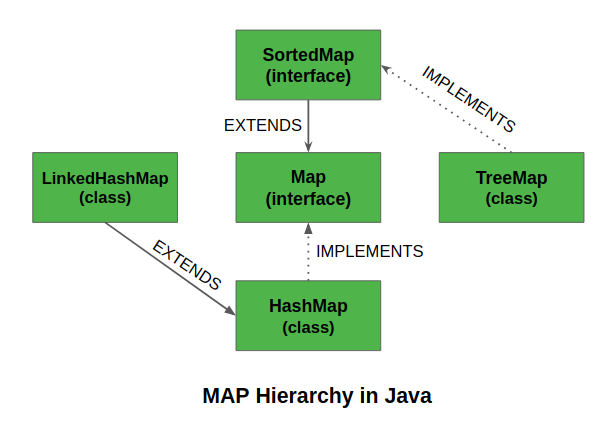
TreeMap in Map Interface Hierarchy:
Features of a TreeMap
Some important features of the TreeMap are as follows:
This class is a member of the Java Collections Framework.
The class implements Map interfaces including NavigableMap, SortedMap, and extends AbstractMap class.
TreeMap in Java does not allow null keys (like Map) and thus a NullPointerException is thrown. However, multiple null values can be associated with different keys.
Entry pairs returned by the methods in this class and its views represent snapshots of mappings at the time they were produced. They do not support the Entry.setValue method.
Now let us move forward and discuss Synchronized TreeMap. The implementation of a TreeMap is not synchronized. This means that if multiple threads access a tree set concurrently, and at least one of the threads modifies the set, it must be synchronized externally. This is typically accomplished by using the Collections.synchronizedSortedMap method. This is best done at the creation time, to prevent accidental unsynchronized access to the set. This can be done as:
SortedMap m = Collections.synchronizedSortedMap(new TreeMap(...));
How does the TreeMap Works Internally?
The methods in a TreeMap while getting keyset and values, return an Iterator that is fail-fast in nature. Thus, any concurrent modification will throw ConcurrentModificationException. A TreeMap is based upon a red-black tree data structure.
Each node in the tree has:
3 Variables (K key=Key, V value=Value, boolean color=Color)
3 References (Entry left = Left, Entry right = Right, Entry parent = Parent)
Constructors in TreeMap
In order to create a TreeMap, we need to create an object of the TreeMap class. The TreeMap class consists of various constructors that allow the possible creation of the TreeMap. The following are the constructors available in this class:
TreeMap()
TreeMap(Comparator comp)
TreeMap(Map M)
TreeMap(SortedMap sm)
Let us discuss them individually alongside implementing every constructor as follows:
Constructor 1: TreeMap()
This constructor is used to build an empty TreeMap that will be sorted by using the natural order of its keys.
Example:
1
// Java Program to Demonstrate TreeMap
2
// using the Default Constructor
3
4
// Importing required classes
5
import java.util.*;
6
7
public class GFG {
8
9
// Method 1
10
// To show TreeMap constructor
11
static void Example1stConstructor()
12
{
13
// Creating an empty TreeMap
14
TreeMap<Integer, String> tree_map
15
= new TreeMap<Integer, String>(); // O(1)
16
17
// Mapping string values to int keys using put()
18
// method
19
tree_map.put(10, "Geeks"); // O(log n)
20
tree_map.put(15, "4"); // O(log n)
21
tree_map.put(20, "Geeks"); // O(log n)
22
tree_map.put(25, "Welcomes"); // O(log n)
23
tree_map.put(30, "You"); // O(log n)
24
25
// Printing the elements of TreeMap
26
System.out.println("TreeMap: " + tree_map); // O(n)
27
}
28
29
// Method 2
30
// Main driver method
31
public static void main(String[] args)
32
{
33
System.out.println(
34
"TreeMap using TreeMap() constructor:\n");
35
36
// Calling constructor
37
Example1stConstructor(); // O(n log n) for put and
38
// O(n) for printing
39
}
40
}
Output
        TreeMap using TreeMap() constructor:

        TreeMap: {10=Geeks, 15=4, 20=Geeks, 25=Welcomes, 30=You}
Time Complexity:
Overall time complexity of the provided code snippet is: O(nlogn)
O(n), where n is the number of elements in the TreeMap.
Constructor 2: TreeMap(Comparator comp)
This constructor is used to build an empty TreeMap object in which the elements will need an external specification of the sorting order.
Example:
1
// Java Program to Demonstrate TreeMap
2
// using Comparator Constructor
3
4
// Importing required classes
5
import java.util.*;
6
import java.util.concurrent.*;
7
8
// Class 1
9
// Helper class representing Student
10
class Student {
11
int rollno;
12
String name, address;
13
14
public Student(int rollno, String name, String address)
15
{
16
this.rollno = rollno;
17
this.name = name;
18
this.address = address;
19
}
20
21
public String toString()
22
{
23
return this.rollno + " " + this.name + " "
24
+ this.address;
25
}
26
}
27
28
// Class 2
29
// Helper class - Comparator implementation
30
class Sortbyroll implements Comparator<Student> {
31
public int compare(Student a, Student b)
32
{
33
return a.rollno - b.rollno;
34
}
35
}
36
37
// Class 3
38
// Main class
39
public class GFG {
40
41
static void Example2ndConstructor()
42
{
43
TreeMap<Student, Integer> tree_map
44
= new TreeMap<Student, Integer>(
45
new Sortbyroll()); // O(1)
46
47
tree_map.put(new Student(111, "bbbb", "london"),
48
2); // O(log n)
49
tree_map.put(new Student(131, "aaaa", "nyc"),
50
3); // O(log n)
51
tree_map.put(new Student(121, "cccc", "jaipur"),
52
1); // O(log n)
53
54
System.out.println("TreeMap: " + tree_map); // O(n)
55
}
56
57
public static void main(String[] args)
58
{
59
System.out.println(
60
"TreeMap using TreeMap(Comparator) constructor:\n");
61
Example2ndConstructor(); // O(n log n) for put and
62
// O(n) for printing
63
}
64
}
Output
        TreeMap using TreeMap(Comparator) constructor:

        TreeMap: {111 bbbb london=2, 121 cccc jaipur=1, 131 aaaa nyc=3}
Time Complexity:
- Overall Time Complexity: O(nlogn)
Space Complexity:
- Overall Space Complexity: O(n)
Constructor 3: TreeMap(Map M)
This constructor is used to initialize a TreeMap with the entries from the given map M which will be sorted by using the natural order of the keys.
Example:
1
// Java Program to Demonstrate TreeMap
2
// using the Default Constructor
3
4
// Importing required classes
5
import java.util.*;
6
import java.util.concurrent.*;
7
8
// Main class
9
public class TreeMapImplementation {
10
11
// Method 1
12
// To illustrate constructor<Map>
13
static void Example3rdConstructor()
14
{
15
// Creating an empty HashMap
16
Map<Integer, String> hash_map
17
= new HashMap<Integer, String>(); // O(1)
18
19
// Mapping string values to int keys using put()
20
// method
21
hash_map.put(10, "Geeks"); // O(1)
22
hash_map.put(15, "4"); // O(1)
23
hash_map.put(20, "Geeks"); // O(1)
24
hash_map.put(25, "Welcomes"); // O(1)
25
hash_map.put(30, "You"); // O(1)
26
27
// Creating the TreeMap using the Map
28
TreeMap<Integer, String> tree_map
29
= new TreeMap<Integer, String>(
30
hash_map); // O(n log n)
31
32
// Printing the elements of TreeMap
33
System.out.println("TreeMap: " + tree_map); // O(n)
34
}
35
36
// Method 2
37
// Main driver method
38
public static void main(String[] args)
39
{
40
System.out.println(
41
"TreeMap using TreeMap(Map) constructor:\n");
42
Example3rdConstructor();
43
}
44
}
Output
        TreeMap using TreeMap(Map) constructor:

        TreeMap: {10=Geeks, 15=4, 20=Geeks, 25=Welcomes, 30=You}
Time Complexity:
- Overall Time Complexity: O(nlogn)
Space Complexity:
- Overall Space Complexity: O(n)
Constructor 4: TreeMap(SortedMap sm)
This constructor is used to initialize a TreeMap with the entries from the given sorted map which will be stored in the same order as the given sorted map.
Example:
1
// Java Program to Demonstrate TreeMap
2
// using the SortedMap Constructor
3
4
// Importing required classes
5
import java.util.*;
6
import java.util.concurrent.*;
7
8
// Main class
9
public class GFG {
10
11
// Method
12
// To show TreeMap(SortedMap) constructor
13
static void Example4thConstructor()
14
{
15
// Creating a SortedMap
16
SortedMap<Integer, String> sorted_map
17
= new ConcurrentSkipListMap<Integer,
18
String>(); // O(1)
19
20
// Mapping string values to int keys using put()
21
// method
22
sorted_map.put(10, "Geeks"); // O(log n)
23
sorted_map.put(15, "4"); // O(log n)
24
sorted_map.put(20, "Geeks"); // O(log n)
25
sorted_map.put(25, "Welcomes"); // O(log n)
26
sorted_map.put(30, "You"); // O(log n)
27
28
// Creating the TreeMap using the SortedMap
29
TreeMap<Integer, String> tree_map
30
= new TreeMap<Integer, String>(
31
sorted_map); // O(n log n)
32
33
// Printing the elements of TreeMap
34
System.out.println("TreeMap: " + tree_map); // O(n)
35
}
36
37
// Method 2
38
// Main driver method
39
public static void main(String[] args)
40
{
41
System.out.println(
42
"TreeMap using TreeMap(SortedMap) constructor:\n");
43
Example4thConstructor(); // O(n log n) for put and
44
// O(n) for printing
45
}
46
}
Output
        TreeMap using TreeMap(SortedMap) constructor:

        TreeMap: {10=Geeks, 15=4, 20=Geeks, 25=Welcomes, 30=You}
Time Complexity:
Overall Time Complexity: O(nlogn)
Overall Space Complexity: O(n)
Convert List to Array in Java
The List interface provides a way to store the ordered collection. It is a child interface of Collection. It is an ordered collection of objects where duplicate values can be stored. Since List preserves the insertion order, it allows positional access and insertion of elements. Now here we are given a List be it any LinkedList or ArrayList of strings, our motive is to convert this list to an array of strings in Java using different methods.
Methods to Convert List to Array in Java
Using get() method
Using toArray() method
Using Stream introduced in Java 8
Method 1: Using get() method
We can use the below list method to get all elements one by one and insert them into an array.
Return Type: The element at the specified index in the list.
Syntax:
public E get(int index)
Example:
1
// Java program to Convert a List to an Array
2
// Using get() method in a loop
3
4
// Importing required classes
5
import java.io.*;
6
import java.util.LinkedList;
7
import java.util.List;
8
9
// Main class
10
class GFG {
11
12
// Main driver method
13
public static void main(String[] args)
14
{
15
16
// Creating a LinkedList of string type by
17
// declaring object of List
18
List<String> list = new LinkedList<String>();
19
20
// Adding custom element to LinkedList
21
// using add() method
22
list.add("Geeks");
23
list.add("for");
24
list.add("Geeks");
25
list.add("Practice");
26
27
// Storing it inside array of strings
28
String[] arr = new String[list.size()];
29
30
// Converting ArrayList to Array
31
// using get() method
32
for (int i = 0; i < list.size(); i++)
33
arr[i] = list.get(i);
34
35
// Printing elements of array on console
36
for (String x : arr)
37
System.out.print(x + " ");
38
}
39
}
Output
Geeks for Geeks Practice
Explanation of the Program:
This Java program demonstrates how to convert a LinkedList of strings to an array using the
get()method in a loop.It creates a LinkedList, adds elements to it, then iterates through the list to copy each element into an array.
Finally, it prints the array elements to the console.
Time and Space complexities:
Time Complexity: O(n), where n is the size of the list.
Space Complexity: O(n), where n is the size of the list.
Method 2: Using toArray() method
The toArray() method without any arguments returns an array containing all of the elements in the list in the proper sequence . The runtime type of the returned array is Object[].
Syntax:
Without Arguments:
public Object[] toArray()
With Array Argument:
public <T> T[] toArray(T[] a)
Example:
1
// Java Program to Convert a List to an array
2
// using toArray() Within a loop
3
4
// Importing utility classes
5
import java.util.*;
6
7
// Main class
8
public class GFG {
9
10
// Main driver method
11
public static void main(String[] args)
12
{
13
14
// Creating an empty LinkedList of string type
15
// by declaring object of List
16
List<String> list = new LinkedList<String>();
17
18
// Adding elements to above LinkedList
19
// using add() method
20
list.add("Geeks");
21
list.add("for");
22
list.add("Geeks");
23
list.add("Practice");
24
25
// Converting List to array
26
// using toArray() method
27
String[] arr = list.toArray(new String[0]);
28
29
// Printing elements of array
30
// using for-each loop
31
for (String x : arr)
32
System.out.print(x + " ");
33
}
34
}
Output
Geeks for Geeks Practice
Explanation of the Program:
This Java program illustrates converting a LinkedList of strings to an array using the
toArray()method.It creates a LinkedList, adds elements to it, and then converts the list to an array with
toArray(new String[0]).Finally, it prints the array elements using a for-each loop.
Time and Space complexities:
Time Complexity: O(n), where n is the size of the list.
Space Complexity: O(n), where n is the size of the list.
Method 3: Using Stream introduced in Java8
The Streams allow functional-style operations on sequences of the elements. The toArray() method of the Stream interface can be used to convert the elements of the stream into an array. The Stream.toArray(IntFunction<A[]> generator) method returns an array containing the elements of this stream.
Syntax:
public <A> A[] toArray(IntFunction<A[]> generator)
Example:
1
// Java Program to Demonstrate conversion of List to Array
2
// Using stream
3
4
// Importing utility classes
5
import java.util.*;
6
7
// Main class
8
class GFG {
9
10
// Main driver method
11
public static void main(String[] args)
12
{
13
14
// Creating an empty LinkedList of string type
15
List<String> list = new LinkedList<String>();
16
17
// Adding elements to above LinkedList
18
// using add() method
19
list.add("Geeks");
20
list.add("for");
21
list.add("Geeks");
22
list.add("Practice");
23
24
// Storing size of List
25
int n = list.size();
26
27
// Converting List to array via scope resolution
28
// operator using streams
29
String[] arr
30
= list.stream().toArray(String[] ::new);
31
32
// Printing elements of array
33
// using enhanced for loop
34
for (String x : arr)
35
System.out.print(x + " ");
36
}
37
}
Output
Geeks for Geeks Practice