Create a class called "Person"with attributes "Name"and "age"
Java: Create and print Person objects
- Write a Java program to create a class called "Person" with a name and age attribute. Create two instances of the "Person" class, set their attributes using the constructor, and print their name and age.
Instance monitoring software
Sample Solution:
Java Code:
 // Define the Person class
public class Person {
    // Declare a private variable to store the name of the person
    private String name;
    // Declare a private variable to store the age of the person
    private int age;

    // Constructor for the Person class that initializes the name and age variables
    public Person(String name, int age) {
        // Set the name variable to the provided name parameter
        this.name = name;
        // Set the age variable to the provided age parameter
        this.age = age;
    }

    // Method to retrieve the name of the person
    public String getName() {
        // Return the value of the name variable
        return name;
    }

    // Method to retrieve the age of the person
    public int getAge() {
        // Return the value of the age variable
        return age;
    }

    // Method to set the name of the person
    public void setName(String name) {
        // Set the name variable to the provided name parameter
        this.name = name;
    }

    // Method to set the age of the person
    public void setAge(int age) {
        // Set the age variable to the provided age parameter
        this.age = age;
    }
}
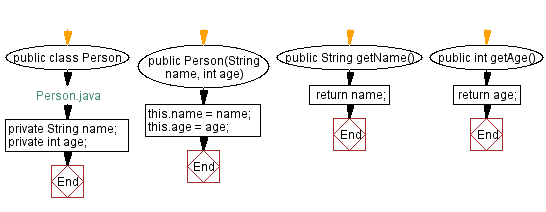
The above class has two private attributes: name and age, and a constructor that initializes these attributes with the values passed as arguments. It also has a getter method to access the attributes.
Method documentation tool
// Define the Main class
public class Main {
    // Define the main method which is the entry point of the program
    public static void main(String[] args) {
        // Create an instance of the Person class with the name "Ean Craig" and age 11
        Person person1 = new Person("Ean Craig", 11);
        // Create another instance of the Person class with the name "Evan Ross" and age 12
        Person person2 = new Person("Evan Ross", 12);

        // Print the name and age of person1 to the console
        System.out.println(person1.getName() + " is " + person1.getAge() + " years old.");
        // Print the name and age of person2 to the console
        System.out.println(person2.getName() + " is " + person2.getAge() + " years old.\n");

        // Modify the age of person1 using the setter methods
        person1.setAge(14);
        // Modify the name and age of person2 using the setter methods
        person2.setName("Lewis Jordan");
        person2.setAge(12);
        System.out.println("Set new age and name:");
        // Print the updated name and age of person1 to the console
        System.out.println(person1.getName() + " is now " + person1.getAge() + " years old.");
        // Print the updated name and age of person2 to the console
        System.out.println(person2.getName() + " is now " + person2.getAge() + " years old.");
    }
}
In the above example, we create two instances of the "Person" class, set their attributes with the constructor, and print their name and age using the getter methods. We also modify the attributes using the setter methods and print the updated values.
Instance monitoring software
Sample Output:
Ean Craig is 11 years old.
Evan Ross is 12 years old.

Set new age and name:
Ean Craig is now 14 years old.
Lewis Jordan is now 12 years old.
Flowchart:
- Java employee details program
In Java, the most searching program is of employee details. An employee is an entity that can have several attributes like id, name, and department, etc. In order to create a java employee details program, we need to create a class for the employee entity and create properties of the employees.
We will create the getter and setter for getting and setting the values of the properties. In the main class, we will create the object of the Employee class, and by using its object, we will access the properties of the Employee class.
The code of the employee details program is very easy to understand. Let's implement the code of the above theory.
EmployeeDetails.java
package JavaTpoint.JavaObjectToJSON;
//Creating Employee class
class EmployeeDetails {
//Creating properties of Employee class
int emp_id, salary;
String name, address, department, email;
//Getter and setters for getting and setting properties
public int getEmp_id() {
return emp_id;
}
public void setEmp_id(int emp_id) {
this.emp_id = emp_id;
}
public int getSalary() {
return salary;
}
public void setSalary(int salary) {
this.salary = salary;
}
public String getName() {
return name;
}
public void setName(String name) {
this.name = name;
}
public String getAddress() {
return address;
}
public void setAddress(String address) {
this.address = address;
}
public String getDepartment() {
return department;
}
public void setDepartment(String department) {
this.department = department;
}
public String getEmail() {
return email;
}
public void setEmail(String email) {
this.email = email;
}
//Overriding toString() method
@Override
public String toString() {
return "Employee [emp_id = " + emp_id + ", salary = " + salary + ", name = " + name + ", address = " + address
- ", department = " + department + ", email = " + email + "]";
}
}
//Creating main class
public class Employee{
//main() method start
public static void main(String args[]) {
//Creating object of EmployeeDetails class
EmployeeDetails emp = new EmployeeDetails();
//Setting values to the properties
emp.setEmp_id(101);
emp.setName("Emma Watson");
emp.setDepartment("IT");
emp.setSalary(15000);
emp.setAddress("New Delhi");
emp.setEmail("Emmawatson123@gmail.com");
//Showing Employee details
System.out.println(emp);
//Getting salary using getter
int sal = emp.getSalary();
int increment = 0;
//Incrementing salary based on condition
if ((sal >=1000) && (sal <=1500))
{
//incrementing salary 2%
increment += (sal * 2)/100;
sal = sal+increment;
emp.setSalary(sal);
System.out.println("\n Salary is incremented \n");
System.out.println(emp);
}else if ((sal >=1500) && (sal <=20000)){
//incrementing salary 5%
increment += (sal * 5)/100;
sal = sal+increment;
emp.setSalary(sal);
System.out.println("\n Salary is incremented \n");
System.out.println(emp);
}else {
System.out.println("\n Salary is not incremented \n");
System.out.println(emp);
}
}
}
Output
Employee [emp_id = 101, salary = 15000, name = Emma Watson, address = New Delhi, department = IT, email = Emmawatson123@gmail.com]
Salary is incremented
Employee [emp_id = 101, salary = 15750, name = Emma Watson, address = New Delhi, department = IT, email = Emmawatson123@gmail.com]
In the above program, we have created limited properties of the Employee class. You can create the number of properties for the Employee class. In the above code, we not only show the employee details but also access the property value using the setters. We update the value of a property based on the conditions too.
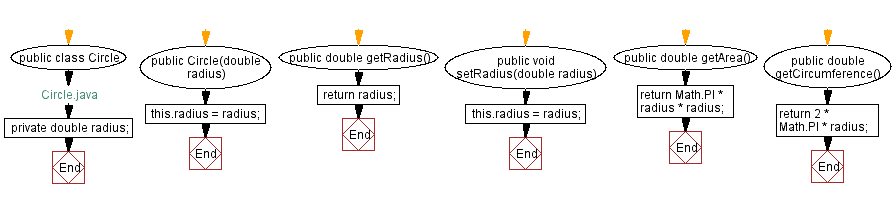
Create a Circle class with area and circumference calculation
Write a Java program to create a class called "Circle" with a radius attribute. You can access and modify this attribute. Calculate the area and circumference of the circle.
Sample Solution:
Java Code:
 // Define the Circle class
 public class Circle {
     // Declare a private variable to store the radius of the circle
     private double radius;

     // Constructor for the Circle class that initializes the radius variable
     public Circle(double radius) {
         // Set the radius variable to the provided radius parameter
         this.radius = radius;
     }

     // Method to retrieve the radius of the circle
     public double getRadius() {
         // Return the value of the radius variable
         return radius;
     }

     // Method to set the radius of the circle
     public void setRadius(double radius) {
         // Set the radius variable to the provided radius parameter
         this.radius = radius;
     }

     // Method to calculate and return the area of the circle
     public double getArea() {
         // Calculate the area using the formula π * radius^2 and return the result
         return Math.PI * radius * radius;
     }

     // Method to calculate and return the circumference of the circle
     public double getCircumference() {
         // Calculate the circumference using the formula 2 * π * radius and return the result
         return 2 * Math.PI * radius;
     }
 }
Radius Measurement Tool
The above "Circle" class has a private attribute 'radius', a constructor that initializes this attribute with the value passed as an argument, and getter and setter methods to access and modify this attribute. It also calculates circle area and circumference using methods.
 // Define the Main class
 public class Main {
     // Define the main method which is the entry point of the program
     public static void main(String[] args) {
         // Declare an integer variable r and initialize it with the value 5
         int r = 5;
         // Create an instance of the Circle class with the radius r
         Circle circle = new Circle(r);
         // Print the radius of the circle to the console
         System.out.println("Radius of the circle is " + r);
         // Print the area of the circle to the console
         System.out.println("The area of the circle is " + circle.getArea());
         // Print the circumference of the circle to the console
         System.out.println("The circumference of the circle is " + circle.getCircumference());
         // Update the radius variable r to 8
         r = 8;
         // Set the radius of the circle to the new value of r
         circle.setRadius(r);
         // Print the updated radius of the circle to the console
         System.out.println("\nRadius of the circle is " + r);
         // Print the updated area of the circle to the console
         System.out.println("The area of the circle is now " + circle.getArea());
         // Print the updated circumference of the circle to the console
         System.out.println("The circumference of the circle is now " + circle.getCircumference());
     }
 }
In the above main() function, we create an instance of the "Circle" class with a radius of 5, and call its methods to calculate the area and circumference. We then modify the radius using the setter method and print the updated area and circumference.
Sample Output:
 Radius of the circle is 5
 The area of the circle is 78.53981633974483
 The circumference of the circle is 31.41592653589793

 Radius of the circle is 8
 The area of the circle is now 201.06192982974676
 The circumference of the circle is now 50.26548245743669
Flowchart:
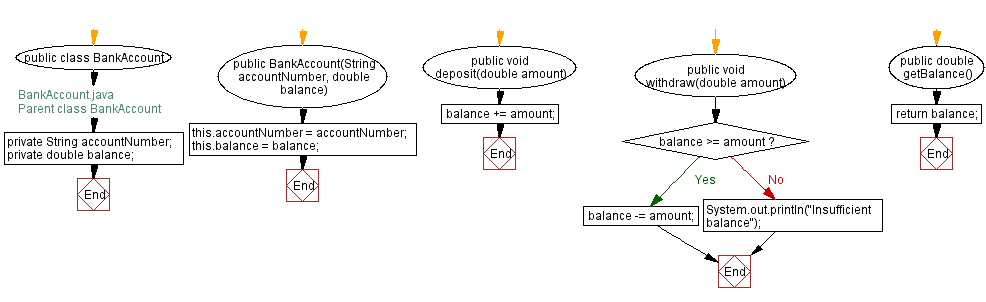
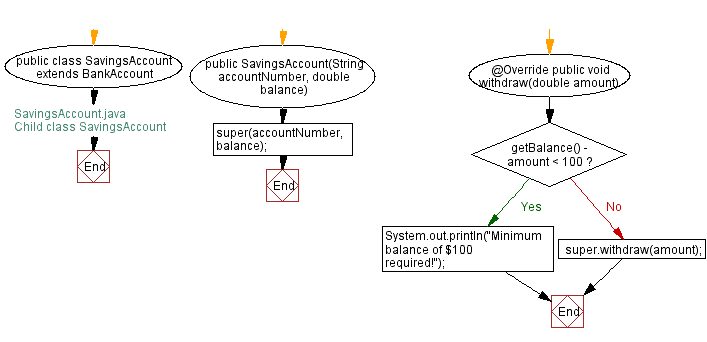
4. Write a Java program to create a class known as "BankAccount" with methods called deposit() and withdraw(). Create a subclass called SavingsAccount that overrides the withdraw() method to prevent withdrawals if the account balance falls below one hundred.
Sample Solution:
Java Code:
 // BankAccount.java
 // Parent class BankAccount

 // Declare the BankAccount class
 public class BankAccount {
     // Private field to store the account number
     private String accountNumber;

     // Private field to store the balance
     private double balance;

     // Constructor to initialize account number and balance
     public BankAccount(String accountNumber, double balance) {
         this.accountNumber = accountNumber;
         this.balance = balance;
     }

     // Method to deposit an amount into the account
     public void deposit(double amount) {
         // Increase the balance by the deposit amount
         balance += amount;
     }

     // Method to withdraw an amount from the account
     public void withdraw(double amount) {
         // Check if the balance is sufficient for the withdrawal
         if (balance >= amount) {
             // Decrease the balance by the withdrawal amount
             balance -= amount;
         } else {
             // Print a message if the balance is insufficient
             System.out.println("Insufficient balance");
         }
     }

     // Method to get the current balance
     public double getBalance() {
         // Return the current balance
         return balance;
     }
 }
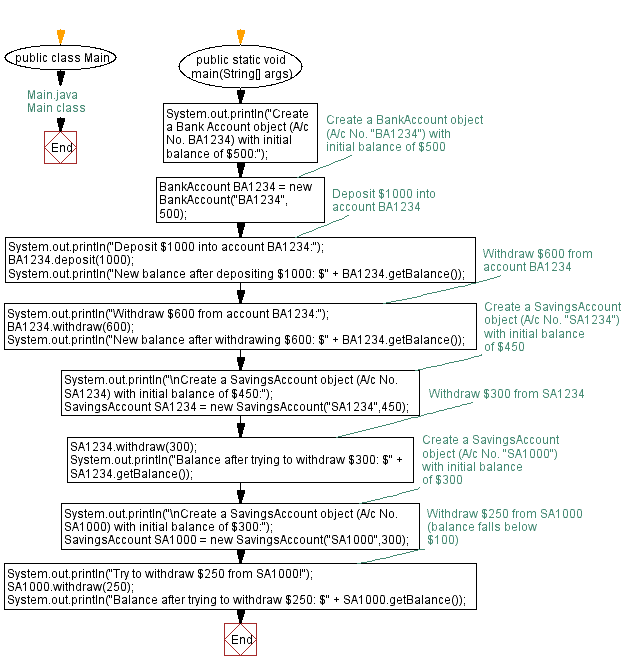
// SavingsAccount.java // Child class SavingsAccount // Declare the SavingsAccount class, inheriting from BankAccount public class SavingsAccount extends BankAccount { // Constructor to initialize account number and balance public SavingsAccount(String accountNumber, double balance) { // Call the parent class constructor super(accountNumber, balance); } // Override the withdraw method from the parent class @Override public void withdraw(double amount) { // Check if the withdrawal would cause the balance to drop below $100 if (getBalance() - amount < 100) { // Print a message if the minimum balance requirement is not met System.out.println("Minimum balance of $100 required!"); } else { // Call the parent class withdraw method super.withdraw(amount); } } }// Main.java // Main class // Define the Main class public class Main { // Main method, entry point of the program public static void main(String[] args) { // Print message to indicate creation of a BankAccount object System.out.println("Create a Bank Account object (A/c No. BA1234) with initial balance of $500:"); // Create a BankAccount object (A/c No. "BA1234") with initial balance of $500 BankAccount BA1234 = new BankAccount("BA1234", 500); // Print message to indicate deposit action System.out.println("Deposit $1000 into account BA1234:"); // Deposit $1000 into account BA1234 BA1234.deposit(1000); // Print the new balance after deposit System.out.println("New balance after depositing $1000: $" + BA1234.getBalance()); // Print message to indicate withdrawal action System.out.println("Withdraw $600 from account BA1234:"); // Withdraw $600 from account BA1234 BA1234.withdraw(600); // Print the new balance after withdrawal System.out.println("New balance after withdrawing $600: $" + BA1234.getBalance()); // Print message to indicate creation of a SavingsAccount object System.out.println("\nCreate a SavingsAccount object (A/c No. SA1234) with initial balance of $450:"); // Create a SavingsAccount object (A/c No. "SA1234") with initial balance of $450 SavingsAccount SA1234 = new SavingsAccount("SA1234", 450); // Withdraw $300 from SA1234 SA1234.withdraw(300); // Print the balance after attempting to withdraw $300 System.out.println("Balance after trying to withdraw $300: $" + SA1234.getBalance()); // Print message to indicate creation of another SavingsAccount object System.out.println("\nCreate a SavingsAccount object (A/c No. SA1000) with initial balance of $300:"); // Create a SavingsAccount object (A/c No. "SA1000") with initial balance of $300 SavingsAccount SA1000 = new SavingsAccount("SA1000", 300); // Print message to indicate withdrawal action System.out.println("Try to withdraw $250 from SA1000!"); // Withdraw $250 from SA1000 (balance falls below $100) SA1000.withdraw(250); // Print the balance after attempting to withdraw $250 System.out.println("Balance after trying to withdraw $250: $" + SA1000.getBalance()); } }Output:
 Create a Bank Account object (A/c No. BA1234) with initial balance of $500:
 Deposit $1000 into account BA1234:
 New balance after depositing $1000: $1500.0
 Withdraw $600 from account BA1234:
 New balance after withdrawing $600: $900.0

 Create a SavingsAccount object (A/c No. SA1234) with initial balance of $450:
 Balance after trying to withdraw $300: $150.0

 Create a SavingsAccount object (A/c No. SA1000) with initial balance of $300:
 Try to withdraw $250 from SA1000!
 Minimum balance of $100 required!
 Balance after trying to withdraw $250: $300.0
Explanation:
The BankAccount class has a constructor that takes account number and balance as arguments. It also has methods to deposit and withdraw money, and to check the account balance.
The SavingsAccount class is a subclass of BankAccount and overrides the withdraw() method. It checks if the account balance falls below one hundred before allowing a withdrawal. The method prints an error message if the balance is below one hundred. If the balance is greater than or equal to one hundred, the method calls the withdraw() method of the superclass to withdraw.
In Main() method -
The main method begins by creating an instance of the BankAccount class with an account number of "BA1234" and an initial balance of $500. It then deposits $1000 into the account and displays the new balance. It then withdraws $600 from the account and displays the new balance.
Next, the method creates an instance of the SavingsAccount class with an account number of "SA1234" and an initial balance of $450. It then attempts to withdraw $300 from the account and displays the new balance. Since the balance remains above the minimum $150 balance required for the account, the withdrawal is successful.
Finally, the method creates another instance of the SavingsAccount class with an account number of "SA1000" and an initial balance of $300. It then attempts to withdraw $250 from the account, which would bring the balance below the minimum balance required for the account. The method displays the new balance after the attempted withdrawal, which should still be $300 since the withdrawal was unsuccessful.
Flowchart: